Browse help topics
Rebuild a client or read documents again
A normal build reuses what Taxably already read. When you need a fresh start, Build prep offers two heavier choices, and asks why first.
- Applies to
- Taxably Connect 3.3.9 and later
- Last reviewed
Most of the time you never need these. A normal build reads new and changed documents and uses what it read last time for the rest, so building a client again is quick. A client whose documents and answers have not changed keeps its sheet as it is.
The three choices in Build prep
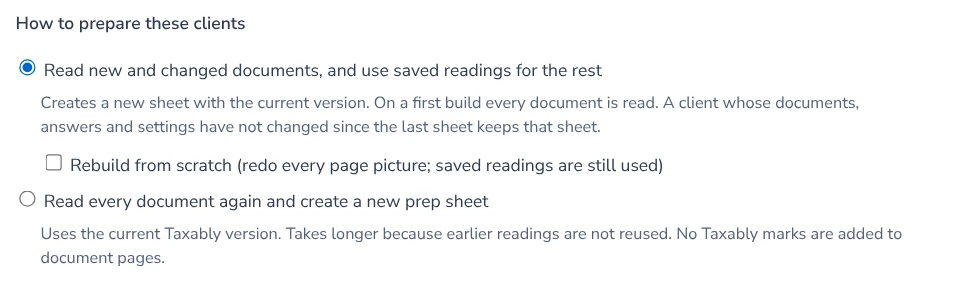
- Read new and changed documents, and use saved readings for the rest. The normal build, and the default. On a first build every document is read.
- Read documents again. Reads every document fresh, as if for the first time. Use it when a sheet looks wrong and you want Taxably to take another look at the paper itself.
- Rebuild from scratch. Starts the client over and draws a new sheet from nothing.
Build prep says, for each client you tick, whether a reading is already saved on this computer. While nothing has been read for any of them, the two heavier choices are not offered, because there is nothing to read again.
Using a heavier choice
- Press Build prep, tick the clients and press Check selection.
- Choose Read documents again or Rebuild from scratch.
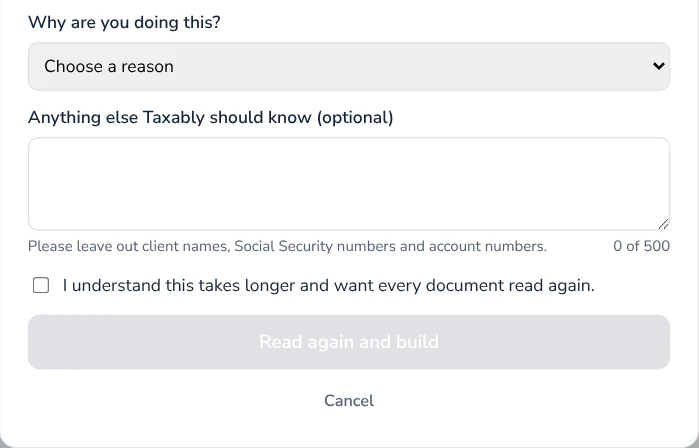
- Pick the reason that fits. "Something else" asks for a short note; leave client names out of it.
- Confirm that you know it takes longer, then build.
What it costs
A client is charged once per tax year, so building a client again for the same year is not charged as a new client. The price line in Build prep is the place to check before you press.
Related articles
- Build prep sheetsChoose your clients in Build prep, see what the build adds to your bill, and confirm. Taxably reads their documents and writes each client's sheet.
- Pricing, and how builds are chargedYou pay for the clients you build, once per client per tax year, and Build prep shows what a build adds to your bill before anything is read.
- A document could not be readA document Taxably could not read is never left out quietly. The sheet names it and says what to do; here are the common cases.
- Manual or Auto-pilot, and when builds startTwo settings decide when sheets appear. Automation says what happens to a client with open questions; Building says when Taxably starts on its own.
Still stuck?
Email support@taxably.ai, or send your question from Help and support.